Fixing Ads.txt & Crawler Errors: Recover Lost Ad Revenue in 2026
An "Ads.txt Not Found" error is a direct leak in your bank account. Let’s plug thehole and get your RPMs back to normal.
If your website runs display ads, there are two silent problems that can quietly destroy your revenue: ads.txt errors and crawler issues. Most publishers don’t even realize these problems exist until their average AdSense earnings suddenly drop without warning. Your traffic might be stable, and your content might still be ranking on page one of Google, but if ad networks and premium buyers cannot properly verify or crawl your site, your inventory becomes a toxic asset in the programmatic marketplace.
In 2026, with stricter programmatic advertising standards and increasing automated fraud prevention, these technical issues matter more than ever. The good news is that they are usually easy to fix once you know where to look. This guide explains exactly how these errors affect your ad revenue and provides a step-by-step roadmap to recovery.
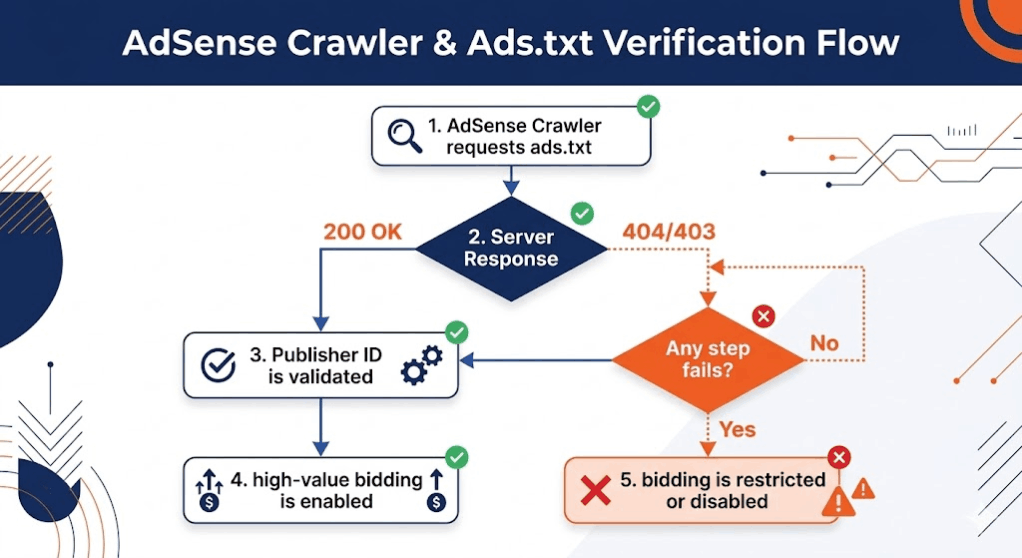
What Is Ads.txt and Why Does It Leak Money?
Ads.txt stands for Authorized Digital Sellers. It is a simple text file placed in the root directory of your website that tells ad buyers which companies are allowed to sell your ad inventory. It acts as a digital passport for your website's monetization. Without it, ad exchanges use "blind bidding," which always results in lower CPMs because the buyer cannot verify that the ad space is legitimate.
In 2026, the digital advertising ecosystem has become increasingly strict about supply chain transparency. Major advertising platforms like Google, Mediavine, and Raptive now prioritize verified inventory. If your ads.txt file is missing or incorrect, your ads will receive significantly fewer bids, your niche RPM benchmarks will collapse, and some high-value buyers may completely ignore your site.
The Crawler Handshake
Most publishers treat these errors as "missing files," but the reality is more complex. Often, the file exists, but your server is ghosting the crawler. An ad crawler is a bot used by ad networks to scan your pages to understand content safety and contextual targeting signals. If your server returns a soft 404 error or a 403 Forbidden status specifically to the Mediapartners-Google bot, you are technically online but financially invisible.
Phase 1: Fixing the "Ads.txt Not Found" Error
The most common error is the file simply not existing at the root level. To fix this, you must ensure the file is located at `yourdomain.com/ads.txt`. If you are using a CMS like WordPress, many plugins claim to handle this, but they often fail during server-side caching updates. Manual placement via FTP or File Manager is the only "expert-approved" method.
Common Formatting Pitfalls
- Invisible Characters: Copy-pasting your publisher ID from a PDF or a rich-text document can introduce invisible characters that break the file structure. Always use a raw text editor (Notepad, VS Code).
- The Case-Sensitive Trap: The file must be named `ads.txt` in all lowercase. `Ads.txt` or `ADS.TXT` will be ignored by most 2026 crawlers.
- Trailing Spaces: A single space after your DIRECT or RESELLER tag can invalidate the entire line.
Phase 2: Resolving Ad Crawler Access Denied
If your dashboard says "Crawler: Not Found," your site’s robots.txt is likely the gatekeeper blocking the vault. By default, many security plugins block "aggressive" bots, and unfortunately, they often misidentify Google’s ad crawlers as threats. This is a critical issue we touched on in our guide on invalid traffic protection —you want to block bots, but you must white-list the money-makers.
To fix this, you must explicitly invite the ad crawler into your site. Add these exact lines to the top of your robots.txt file:
User-agent: Mediapartners-Google
Allow: /
This tells the specific bot responsible for AdSense targeting that it has full access to analyze your pages. Without this, the system won't know if your content is "Safe for Advertisers," and you will be stuck with low-value "Public Service Announcement" ads that pay zero revenue.
Phase 3: The Firewall and CDN Conflict
In 2026, many publishers use Cloudflare or high-end security firewalls to protect against DDoS attacks. However, if your firewall is set to "I'm Under Attack" mode or has strict JavaScript challenges, the ad crawler may fail to load the page. Because these bots do not execute JavaScript the same way a browser does, they get stuck at the challenge screen.
The Fix:Create a WAF bypass rule for the User-Agent "Mediapartners-Google". This ensures your site stays protected from malicious bots while allowing the revenue-generating bots to pass through freely. This is especially important for sites struggling with low value content errors, as a failed crawl can lead to an automated rejection.
Phase 4: Recovering the Lost Revenue (The Triage)
Once you have implemented the technical fixes, you must follow the 2026 AdSense Triage to ensure the system recognizes the changes. Google’s "AdSense Crawler" and "Search Crawler" work on different schedules. Do not expect an immediate recovery. It typically takes 48 to 72 hours for the system to re-verify your authorization.
- Step 1: Use a header checker tool to verify that your ads.txt returns a 200 OK response code.
- Step 2: Manually trigger a crawl if your ad platform allows it (Google AdSense has a "Crawl" button in the Policy Center for some errors).
- Step 3: Monitor your RPM and Fill Rate daily. A successful fix usually results in a vertical spike in revenue as high-value bids return to the auction.
Signs Your Technical Fix Worked
You will know the issue is resolved when you see a sudden stabilization in your ad fill rates. When ads.txt is broken, you might see fill rates drop to 40% or 50%. After the fix, this should return to 95%+. Additionally, your ad relevance will improve—you will stop seeing generic ads and start seeing high-intent, contextually relevant products that match your content niche.
Best Practices for the 2026 Publisher
Technical ad infrastructure is not a "set it and forget it" task. To avoid future leaks, follow these rules:
- Audit Monthly: Once a month, visit `yourdomain.com/ads.txt` in an incognito window to ensure it still loads.
- Update Immediately: Whenever you add a new ad network or mediation partner, update your file within 24 hours.
- Monitor Policy Center: Check your ad dashboard twice a week for any warnings. "Crawler: Not Found" is an emergency that requires immediate attention.
Final Thoughts: The Hidden Revenue Leak
Many publishers focus 100% of their energy on SEO traffic growth. While traffic is the fuel, your technical ad setup is the engine. A perfectly optimized website with 1 million visitors will still earn less than it should if your ads.txt is broken or your crawlers are blocked. Fixing these technical issues often leads to immediate, double-digit RPM improvements without the need for a single new visitor. Treat your technical ad infrastructure with the same respect you treat your content, and the programmatic market will reward you with the highest possible bids.